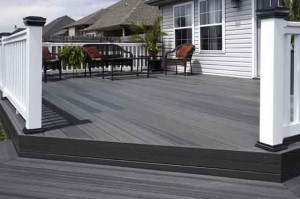
Replace Your Old Wood Deck With A Decking Composite Material (Video)

A natural wood deck looks great. But if you live in an area that gets lots of rain and you do not have time to maintain it, you should consider an alternative material. One of the most talked about alternatives is is a composite decking material.

Composite decking is becoming very popular and there are a lot of different products available. Before you purchase something, I recommend you talk to your builder and visit a few building centers to see what is available.

Your builder will have his favorite material and he will be able to give you lots of information on that product. He should also be able to give you references for projects he has worked on. 

Your local building centers should also carry composite material and they might even have a demonstration area where you can see the different products installed. This can be very helpful as you decide what material you want to install. They can also provide good information on the products they carry.

Removing The Old Wood Deck Boards

Once you’ve decided on the building material you will need to remove your old deck and get started on your new deck. If the wood decking is screwed in and in good shape you should be able to remove the screws and then pull up the boards.

If the boards are nailed in and hard to remove you will want to purchase or rent a deckboard removal tool. This tool can really reduce the time it takes to remove your old deck and make a tough job fun. The video at the bottom of this article shows the deckboard removal tool in action. 

Installing The New Decking Composite Material

As you remove your old boards you will be able to determine the integrity of the wood joist and beams. If the wood is looking rotten or unsafe you will want to replace them before you put down your new deck. But hopefully it is fine and you can start putting down your new boards.

One nice thing about the composite boards is that they are the same width as standard wood decking and you can easily replace the composite boards. You can screw the boards into the decking but a better option is to use under deck fasting system. I like this kind of system because it is easy to install and there are no screws to pop up or be seen


Deck Plan For Free

Deck plan for free from the Internet

Finding free deck plans on the Internet is always fun

I just found this great site that has a couple of deck plans for free. If you are thinking about building a deck and looking for plans you should check it out.

The free plans are in a PDF and you can download them today. I downloaded both plans with no problems. They also have a free plan to build a shade cover for your deck that I’m thinking of adding to my deck.

The one thing I like about these plans compared to some other free plans I’ve found on the Internet is that they are very detailed. There is step by step instructions and lots of pictures and diagrams to explain the complete construction process.

This includes attaching the 2×10 ledger board to the side of your house and attaching the joist hangers in the plan to build the stone deck. It is still using wood for the floor, but the sides not attached to the house are made of stone.

The Dream Deck plan is for a 16 feet x 18 feet and it includes a bay. This set of deck plans also has detailed information and includes a full material list. The floor is made of a composite material, but I’m pretty sure you could change this for a cedar or other wood material. Here’s the link for the deck plan free: Family Handyman.

More Free Deck Plans

If you are looking for more free plans I found a deal where you get 70 free deck plans when you purchase a package of deck design software. The nice thing about having the plans included with the software, is that you can use the software to make changes to the plans to get your dream deck. 

So if you want your deck a bit bigger, smaller or whatever, you can change it with the software. I’ve reviewed this software before and here’s the link: Design a Deck Software.

Photos of 12 Outdoor Fireplaces and Fire Pits

Outdoor gas fire pit on composite deck

Are you planning on building an outdoor fireplace or fire pit? Here’s one photo of a gas fire pit on a nice deck with a view of the city.

If you are looking for more ideas I found a great article at “Do It Yourself Network”. They have 12 different ideas that are worth looking at for inspiration.

If you want to have a look, here’s the link to click on.

They are all great fire pits, but my favorite is 8 and 12. What’s your favorite?

The Easy Way To Build A Deck With Deck Design Software

We’ve been thinking of building a new deck for a few years now. Our old deck was just too small and it the wood deck railing was starting to rot. When we first moved into our house the new deck was smaller than our old covered patio but it seemed large enough. We put our wood table and chairs and wood bench on the deck and it seemed that we had enough room.

For the four of us the deck space was fine, but when we had a few friends over we realized it was way too small. And this was only with a couple of additional friends or family members. Once you were sitting down at the table it was okay, but if someone wanted to get up it was very tight. The barbecue only complicated things and there was no room for a patio heater.

After a few years of being short of space we moved the table off of the deck and kept the chairs and wood bench. This gave us a lot more room to entertain but we could no longer eat outside on deck. That’s when we started planing for a new deck. I won’t go into all of the details on this post, but last year we finally decided it was time to build a larger deck.

Reasons to have a plan:
This is where deck design software comes in. If you are going to build a new deck you need a plan. Even if it is a small deck it’s good to have a deck plan and here’s a few reasons why:

  • Provides drawings of what you are building so everyone agrees on itEnsures you purchase all of the necessary parts.
  • If you are building the wood deck it provides your plan to ensure you build it correctly.
  • If a contractor is building your deck then this is an important document to agree on price and ensure they build it to your specifications.
  • And finally, depending on the deck you may need to have the plans approved by city hall before you can start the work

7 reasons to use deck design software to easily create your deck plans:
If you are making a small or simple wood deck, then you can probably purchase or download a free deck plan. If your deck is more complicated or unique you will want to use deck design software or have an architect create a set of plans for you. Here’s additional benefits of using design a deck software:

  1. Most software packages will create a list of all of the parts and supplies you need to purchase. This will help you to determine the cost of your project and make it easy when you go to the building center to get everything. 
  2. Provides a realistic drawing of what your deck will look like when it is finished. Some packages will do this in 3D colour and allow you to move around your deck. This will show you exactly what your completed deck will look like and how much space you will have.
  3. You can quickly come up with a few different designs to help you decide on what is the best style of deck for your available space and purpose. This helps when you are trying to decide on your deck layout. Do you want a wrap around deck? Where should the stairs go? Do I want to add build in deck benches? 
  4. Provides a library of parts, deck furniture and even items like barbecues and deck heaters that you can drag and drop into your design. This makes your deck plans look very realistic and helpful as you design your deck. 
  5. With some packages you can create your landscape and hard scape design. This was very helpful for us because we were doing a complete back yard makeover.
  6. It’s easy and inexpensive to make changes to your plans. We originally used a draft person to create our plans and when we had to make a change because the deck was over the setback we had to pay another $500 for the change. 
  7. The software allows you to create different views and drawings. the list can include: a top down view, side view, a structure view that just includes the posts and beams.
  8. Some packages will come editable designs. This makes it easy to get started because you are working on a pre-completed plan and you just add your changes and additions to the plan.

Please comment on this post if you have any questions or would like more information.